Technology Talk
 Throughout the education program we have talked about QR Codes and how important they are to our classroom. These codes eliminate lengthy web addresses to sites we want our students to visit with a simple code for the students to scan with a QR code reader. These not only are perfect for students with challenges, but also our class as a whole. This would work great if you are teaching using stations that have web linked content. This would help the stations move more efficiently.
We all know children like to explore, but the internet is not somewhere we want them to explore freely. QR codes take away from the wandering on search engines and misspelling of web addresses to lead to sites that students do not need to see.
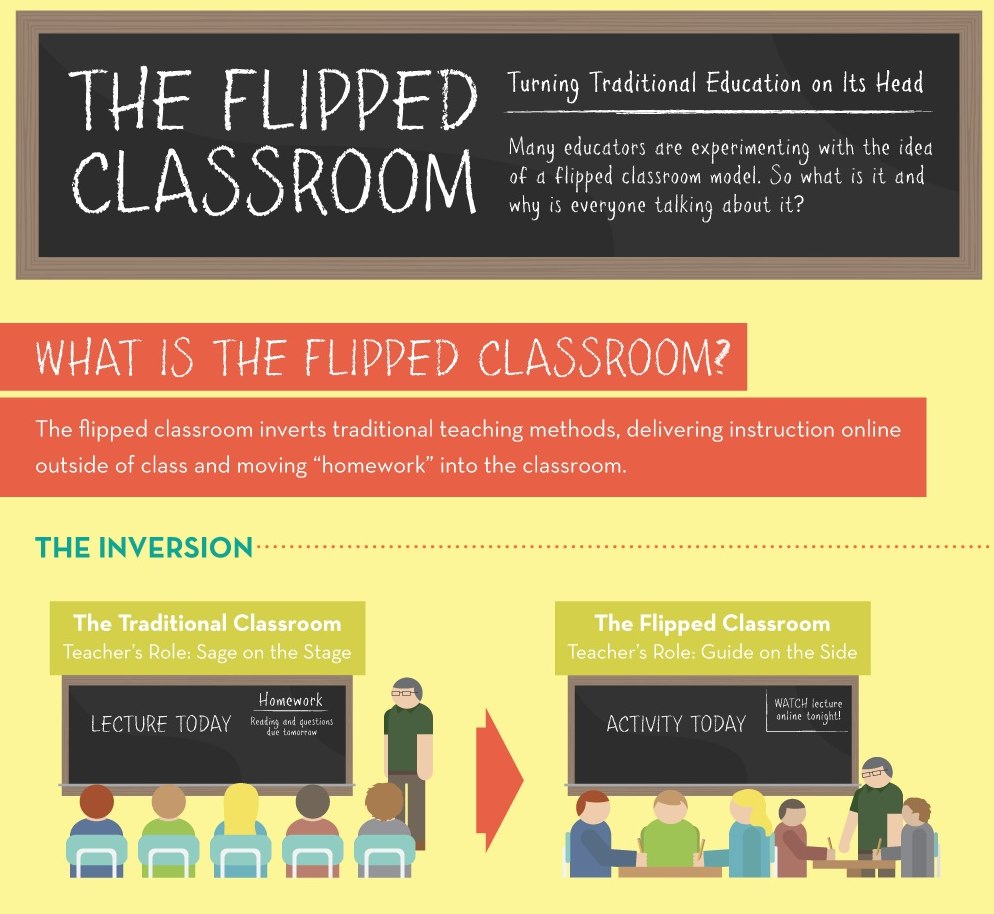 Flipped Classroom is a new way of teaching that I myself only heard about last semester in Lit Block. This basically means that the students are given content to view at home then when they come to class they teacher addresses misconceptions and digs deeper into the subject. It also allows students to get the content material at home so they can have more time to work in class on things they might need help with. Flipping the classroom allows the teacher to have more time with the students actually doing the work then teaching and giving the work for homework. You might ask "What if a student doesn't have a device at home?". Flipping the classroom could be modified in those cases. The student can view the content before going home, or even get a print out of what is on the digital tool. Sending them home with a QR code that sends them directly to what they need to do that night is also another great idea.